







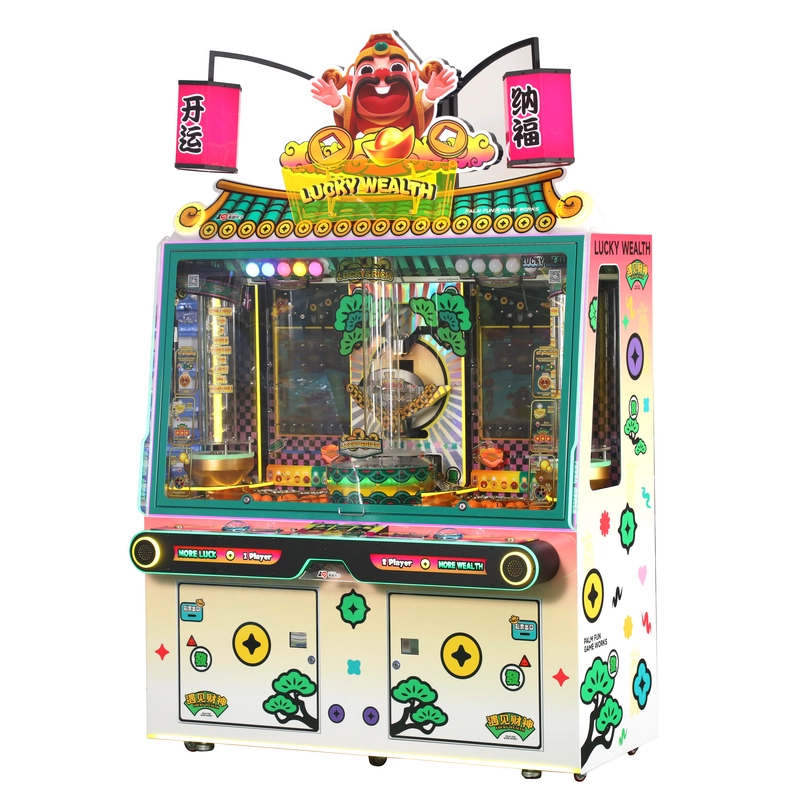
The most effective way to reduce coin jams, unplanned downtime, and maintenance costs is to keep the coin path clean, use the correct coin or token specification, inspect moving parts before wear becomes a failure, and record recurring faults by machine. High-traffic machines need more frequent inspection than low-use equipment, so the maintenance interval should be adjusted according to operating hours, venue conditions, and the manufacturer’s service instructions.
A properly maintained coin pusher arcade machine is more than a game—it is a revenue-producing asset. Regular maintenance reduces downtime, extends mechanical life, improves player experience, and protects your investment. This checklist is designed for operators, technicians, and owners of amusement centers, arcades, and family entertainment centers who need a practical and repeatable preventive maintenance program.
Safety note: Disconnect the machine from its power source before opening service panels, clearing internal jams, cleaning moving assemblies, or replacing parts. Live electrical measurements, control-board work, firmware updates, and repairs involving stored electrical energy should only be performed by qualified personnel.
Printable Coin Pusher Maintenance Checklist at a Glance
Use the following table as the main maintenance schedule. Each venue should add the machine model, serial number, inspection date, staff name, findings, and corrective action to its maintenance record.
| Frequency | Maintenance Task | Responsible Role | Power Off Required | What to Record |
|---|---|---|---|---|
| Daily opening | Inspect the cabinet, glass, playfield, coin entry, payout tray, lighting, buttons, and visible coin paths | Floor staff | No, unless an obstruction must be removed | Damage, foreign objects, unusual noise, rejected coins, or lighting faults |
| Daily play test | Run one or two normal plays and confirm smooth pusher movement, coin acceptance, sensor response, and reward output | Floor staff | No | Irregular movement, delayed response, ticket errors, or payout discrepancies |
| Daily closing | Remove visible debris, organize collection areas, clean exterior glass, and review reported faults | Floor staff | Yes for internal cleaning | Coins or objects removed, cleaning completed, and unresolved issues |
| Weekly | Clean accessible coin paths, acceptors, sensor covers, playfield edges, service areas, and ventilation openings | Trained staff | Yes | Dirt buildup, recurring jam location, loose hardware, and sensor condition |
| Weekly | Inspect visible fasteners, cabinet locks, safety switches, pusher guides, brackets, and payment interfaces | Trained staff | Yes | Loose, damaged, misaligned, or worn components |
| Monthly | Inspect the motor, gearbox, linkage, couplings, belts, bearings, guide rails, limit switches, and wiring harnesses | In-house technician | Yes | Wear, play, abnormal sound, heat, damaged insulation, or replacement needs |
| Monthly | Review coin-acceptor performance, jam records, downtime, repeat failures, and parts consumption | Technician or operations manager | Depends on task | Jam count, rejection rate, downtime, repeated faults, and parts replaced |
| Quarterly | Complete a full mechanical, low-voltage electrical, sensor, safety, and configuration inspection | Qualified technician | Yes | Inspection result, corrective work, software version, and machine status |
| Quarterly | Apply manufacturer-approved lubrication where required and verify pusher alignment and travel | Qualified technician | Yes | Lubrication point, lubricant used, alignment result, and abnormal wear |
| Annually or after major repair | Review the complete service history, safety condition, recurring faults, spare-parts plan, and future replacement needs | Operations manager and technician | Yes for inspection | Annual findings, high-cost components, repeat failures, and action plan |
These intervals are general guidelines. Increase the inspection frequency for machines operating continuously, machines exposed to dust or humidity, and machines with a history of repeated coin jams or mechanical faults.
How Can Arcade Operators Reduce Coin Jams and Maintenance Costs?
Coin jams often begin with simple issues: foreign objects, mixed coin sizes, damaged tokens, dirty acceptors, loose chutes, worn guides, or an incorrect entry angle. Addressing these conditions early is less expensive than waiting until a jam damages a sensor, motor, linkage, or control component.
Use One Approved Coin or Token Specification
Use only the coin or token size specified for the installed acceptor and coin path. Mixing diameters, thicknesses, weights, or damaged tokens increases the risk of rejection and blockage. When replacing a coin acceptor, verify its voltage, connector, communication method, coin settings, mounting dimensions, and control-board compatibility.
Track Where Jams Occur
Do not record every incident only as “coin jam.” Identify the exact location:
- Coin entry slot
- Coin acceptor
- Exit chute
- Diverter or guide
- Playfield entry
- Side-return path
- Collection or payout area
If jams repeatedly occur in the same location, inspect that component for contamination, looseness, deformation, an incorrect mounting angle, or an incompatible coin specification. Repeatedly clearing the same blockage without correcting its cause increases labor cost and machine downtime.
Replace Worn Modular Parts Before They Cause Secondary Damage
A loose guide, worn bearing, damaged coupling, or misaligned linkage may initially create only a minor noise or occasional jam. Continued operation can place additional load on the motor, gearbox, sensors, or cabinet structure.
Planned replacement of a confirmed worn part is generally more efficient than replacing several major components after a secondary failure. Maintenance records should therefore identify early warning signs rather than record only complete breakdowns.
Standardize Common Parts Across a Machine Fleet
Operators managing several machines can reduce inventory complexity by standardizing common fuses, switches, sensors, locks, connectors, and service tools where the specifications genuinely match. Model-specific motors, control boards, configured coin acceptors, pusher plates, and firmware-related components should be confirmed with the original manufacturer before purchase.
Consider Cashless Payment Where It Fits the Venue
Compatible card or cashless systems can reduce problems associated with dirty coins, mixed tokens, coin collection, and physical acceptor wear. However, cashless conversion does not eliminate maintenance requirements. Card readers, network connections, power supplies, sensors, and software still require inspection and support.
Daily Opening and Closing Checks
Daily maintenance minimizes interruptions and keeps machines attractive to players. These are quick checks that staff can perform during opening, shift changes, or closing.
Daily Opening Checklist
- Inspect the cabinet and glass for cracks, loose panels, sharp edges, or signs of tampering.
- Check the playfield for foreign objects, misplaced prizes, damaged coins, or visible obstructions.
- Confirm that the coin tray, hopper, payout area, and collection paths are correctly positioned.
- Check lighting, displays, buttons, sound, card readers, and payment interfaces.
- Run one or two normal plays to confirm smooth pusher movement and correct sensor response.
- Listen for grinding, knocking, slipping, or irregular motor noise.
- Confirm that tickets, points, cards, or other rewards are recorded and issued correctly.
- Log any abnormal condition with the machine model, time, symptom, and staff member.
Daily Closing Checklist
- Review all faults or player complaints reported during the day.
- Clean the exterior glass, buttons, payment surface, and visible cabinet areas.
- Disconnect power before removing internal debris or clearing accessible obstructions.
- Confirm that service doors, collection doors, and locks are secure.
- Record unresolved faults and mark the machine out of service when continued operation could cause damage or create a safety risk.
Weekly Cleaning and Inspection
Weekly tasks require brief downtime and should be completed consistently before small issues develop into repeated jams or component failures.
- Clean accessible coin paths: Remove dust, fragments, damaged tokens, adhesive residue, and foreign objects. Use only cleaning methods approved for the installed acceptor and sensors.
- Inspect mechanical fasteners: Check visible screws, bolts, brackets, coin rails, service panels, and pusher mountings for looseness.
- Inspect the coin acceptor: Clean accessible optical areas and confirm that the configured coin or token is accepted consistently.
- Inspect sensor covers: Clean dust from accessible optical or infrared sensor surfaces without changing their alignment.
- Check cabinet locks and safety switches: Confirm that access panels close correctly and that interlocks have not been bypassed.
- Inspect buttons and payment interfaces: Confirm normal response and look for loose mountings or damaged cables.
- Review jam records: Identify any machine or location with repeated incidents during the previous week.
Compressed air should only be used where approved by the manufacturer. Excessive pressure can drive dust further into sensors, bearings, connectors, and control assemblies.
Monthly and Quarterly Preventive Maintenance
Monthly and quarterly tasks focus on gradual wear, alignment, electrical condition, and safety-critical systems. These checks should be completed by trained technicians using the correct service manual.
| Task | Interval | Required Action | Escalation Condition |
|---|---|---|---|
| Mechanical drive inspection | Monthly | Inspect the motor, gearbox, couplings, belts, crank, linkage, bearings, bushings, and mounting hardware | Grinding, excessive play, overheating, damaged gears, or repeated stalling |
| Pusher alignment | Monthly | Confirm smooth travel, parallel movement, guide condition, and clearance from the cabinet and playfield | Binding, uneven travel, plate contact, or repeated overload |
| Low-voltage wiring inspection | Monthly | Check accessible harnesses, plugs, switches, and sensors for looseness, corrosion, crushed insulation, or heat damage | Burnt connectors, repeated disconnection, exposed conductors, or unidentified short circuits |
| Coin acceptor inspection | Monthly | Review rejection rate, coin settings, mounting alignment, connector condition, and communication with the machine | Persistent rejection after approved cleaning and verification |
| Lubrication | Quarterly or as specified | Apply only the manufacturer-approved lubricant to specified bearings, pivots, or guides | Unknown lubrication point, contaminated surface, or incompatible lubricant |
| Sensor and switch inspection | Quarterly | Verify secure mounting, clean sensing surfaces, correct activation, and stable connectors | Repeated false triggers, intermittent output, or damaged wiring |
| Software and configuration review | As released or required | Record the current software version and install only manufacturer-authorized updates for the exact model | Unknown firmware source, incompatible board revision, or payout changes requiring approval |
| Safety inspection | Quarterly | Inspect guards, locks, service panels, glass, grounding connection, warning labels, and emergency controls | Structural damage, damaged glass, missing guards, or electrical safety concern |
Lubrication and Mechanical Adjustments
Use only manufacturer-recommended lubricants. Apply lubricant sparingly because excess lubricant attracts dust and can contaminate coins, optical sensors, belts, connectors, or the playfield.
Inspect gear teeth, couplings, pivots, bearings, guides, and pusher linkages for visible damage or abnormal wear. Do not file, grind, bend, or reshape a damaged coin rail unless the manufacturer has provided a documented repair procedure. Replacing a damaged guide is usually safer than changing its dimensions without a specification.
Confirm that the pusher assembly moves parallel to the playfield and does not contact the cabinet, glass, coin guides, or other components. Stop operating the machine when misalignment produces binding, repeated overload, or unusual noise.
Maintenance Responsibility and Safety Levels
Assigning clear responsibilities prevents untrained staff from carrying out work that should be performed by a technician.
Floor Staff Tasks
- Exterior cleaning
- Visual inspection
- Normal play testing
- Checking lights, buttons, and payment interfaces
- Recording faults and player reports
- Removing only visible obstructions after power has been disconnected
Trained In-House Technician Tasks
- Opening service panels using the approved lockout procedure
- Cleaning coin acceptors and accessible sensors
- Inspecting motors, gearboxes, linkages, switches, and low-voltage wiring
- Replacing compatible modular motors, sensors, switches, coin acceptors, and power-supply modules
- Applying manufacturer-approved lubrication
- Confirming alignment and mechanical travel
Manufacturer or Qualified Electrical Technician Tasks
- Live electrical measurements
- Ground-continuity and mains electrical testing
- Power-supply circuit repair
- Control-board component repair
- Firmware installation or recovery
- Repeated fuse or breaker failures
- Unknown short circuits or overheating
- Changes to payout, game logic, or protected configuration parameters
Never bypass an interlock, sensor, fuse, or safety device to keep a machine operating. A temporary bypass can create a more serious mechanical, electrical, or liability problem.
Maintenance Records and Performance Indicators
Good records help operators identify machines that consume excessive labor or repeatedly fail in the same way. Each maintenance entry should include:
- Machine model and serial number
- Date and operating location
- Reported symptom
- Inspection task completed
- Fault location
- Part number replaced
- Technician or staff member
- Downtime duration
- Corrective action
- Final test result
- Next inspection date
Useful Maintenance KPIs
| KPI | How to Calculate or Record It | Why It Matters |
|---|---|---|
| Machine uptime | Available operating hours divided by scheduled operating hours | Shows how consistently the machine remains available to players |
| Unplanned downtime | Total hours unavailable because of faults | Identifies machines creating operational disruption |
| Coin jams | Number of jams by machine and exact jam location | Reveals recurring coin-path or acceptor problems |
| Repeat fault rate | Number of faults returning after the same repair | Shows whether the root cause was corrected |
| Average repair time | Total repair time divided by completed repair incidents | Helps plan staffing and spare-parts inventory |
| Parts consumption | Parts used by model and fault type | Supports more accurate inventory planning |
Actual maintenance cost varies by machine model, operating hours, local labor rates, component specification, freight, and whether the part is OEM or aftermarket. Instead of relying on a universal cost estimate, operators should calculate the impact using their own records:
Maintenance impact = avoided downtime value − maintenance labor, consumables, and replacement-part cost.
This calculation should be based on the venue’s actual operating data rather than an assumed daily revenue figure.
When Preventive Maintenance Becomes a Repair
A maintenance checklist is intended to prevent faults and identify deterioration early. Once a machine has stopped functioning normally, the problem should be transferred to a structured troubleshooting and repair process.
Stop normal operation and escalate the machine when it shows:
- Repeated fuse or breaker failures
- A pusher plate that does not move or binds during travel
- Severe grinding, knocking, or uncontrolled movement
- Burnt wiring, smoke, or an electrical odor
- Damaged glass, guards, locks, or cabinet structure
- Persistent coin rejection after approved cleaning
- Repeated sensor errors or reward-output faults
- Motor overheating or repeated overload
- Control-board errors or firmware problems
For symptom-based diagnosis and replacement-part checks, use the Coin Pusher Machine Repair Guide. Do not duplicate a full electrical or mechanical repair process inside the preventive maintenance schedule.
What to Send PALM FUN Technical Support
Complete information helps the manufacturer distinguish between maintenance, mechanical wear, electrical faults, software issues, and incompatible parts. Before requesting technical support, prepare:
- Machine model and serial number
- Country and local supply voltage
- Clear video showing the fault
- Photos of the affected component, connector, and installation position
- Error messages or control-board indicator status
- Recent maintenance history
- Checks already completed
- Part numbers already replaced
- Current software or firmware version where applicable
PALM FUN provides commercial coin pusher and redemption equipment, model-specific documentation, replacement-part identification, and technical support. Operators can review available service manuals or explore PALM FUN’s commercial coin pusher machines.
Conclusion
A useful coin pusher maintenance checklist should do more than list occasional cleaning tasks. It should establish clear daily, weekly, monthly, quarterly, and annual responsibilities; identify who is qualified to perform each task; record recurring jams and failures; and define when the machine must be removed from service.
The most important cost-control measures are consistent coin-path cleaning, use of the correct coin or token, early identification of mechanical wear, accurate maintenance records, compatible replacement parts, and timely escalation of faults that exceed normal operator maintenance.
By applying a repeatable preventive maintenance program, arcade and FEC operators can reduce avoidable coin jams, shorten unplanned downtime, protect major components, and make better decisions about staffing, spare parts, and machine replacement.
palmfunarcade
Palm Fun Arcade Game
Whatsapp: +8618126837443
PalmFun Arcade
PalmFun_Arcade
PALM FUN Redemption Machine